Microsoft wants to bring a big smile on your faces this holiday season. From the very next day after Thanksgiving, Microsoft will uncover lots of hot deals on their online Microsoft Store. Here is a glimpse of what’s coming:
» Free Lenovo S10 netbook upon buying a Lenovo T400 or X301 notebook, or A600 All-in-one desktop PC.
» Free ground shipping on everything for a limited period of time.
» $70 Discount on Office Home & Student 2007. Now available at just $79.99. Or save almost $80 on Office Small Business Edition.
» Buy an Xbox Elite Console and get 3-month subscription to Xbox LIVE FREE.
» 30% off on selected Xbox accessories.
» Get $50 discount on HP Photosmart Printer.
» Buy an Xbox Premium Console + Beatles Rock Band and Save $50.
» Buy any desktop or laptop (Netbooks excluded) and get$50 discount on any monitor.
These deals are worth a loot and are certainly for a limited period of time. Go to Microsoft Store for more details.
Deals start at 12:01 AM EST Friday, November 27, 2009.
It’s no mystery that social networking sites like Facebook and Twitter offer vast opportunities to spread your word quickly, efficiently and without any hard labor. When you upload a video to Youtube, you obviously want the world to see. You go about manually putting links to your videos in your Facebook status, email them or tweet them. Well, Youtube now offers a feature that can simplify the job of sharing your uploaded videos and it’s completely automated. If you want, to autoshare your videos uploaded to Youtube to Facebook, Twitter or Google reader, here’e how you go about it:
1) Login to your Youtube account and go to your ‘Account‘ settings.
2) In the left pane, click ‘Sharing’.
3) In the right pane, you will find the ‘AutoShare options’. Click on the service on which you wish to autoshare your uploaded videos. Authorization on respective services will follow.
4) Finally click ‘Save Changes’. Here after, whenever you upload a video, it will get autoshared on the connected services. (Videos marked ‘private’ won’t be shared.)
The festive season is not too far away and so I thought of creating some eyecandy using Christmas as a theme. Did my best in Photoshop to make some beautiful hi-resolution wallpapers and then gift-wrapped them into a Windows 7 themepack. Enjoy!
I must make it clear that this little tip is for beginner’s only. You must have experienced that many of your contacts have multiple email accounts and its quite irritating to see your address book filled with multiple entries of the same person. The reason is, Windows Live Hotmail treats every email address as a unique contact and this makes your address book unorganized and cumbersome to use. However, Windows Live Hotmail offers a feature to counteract this issue.
Here’s how you can either merge multiple email IDs of the same contact or delete all but one of their email IDs:
1) In your Windows Live Hotmail account, click ‘Options’ > ‘More options’.
2) Now, under the ‘Customize your contacts’ category, click ‘Clean up duplicate contacts’.
3) Then click the ‘Clean up duplicate contacts’ button and select a contact from the list.
4) Now you can either select all but one contact details and delete the rest or you can select all and merge them.
There you are. You just made your address book much more clean and well-organized.
Today’s technological scenario is all about integration and making every task simpler and every information easily accessible. Well, similar are the thoughts of UXLabs at Microsoft. They have created a very sleek Facebook client application that brings the complete Facebook experience right on your Windows desktop – Fishbowl.
Although in a ‘trial’ (beta) stage, Fishbowl offers some features that surely will excite Facebook power users. Apart from the seamless integration with Facebook, here are some of the plus points of Fishbowl:
» Fishbowl offers mini-mode which is more fun and less obtrusive.
» Smooth user interface and sleek navigation. It supports drag n’ drop pictures to publish them on Facebook. Furthermore, it can go full screen and play a slideshow of your albums.
» You can update your status, view your friends’ albums, their updates, news-feeds and other notifications.
» “Interest Level”, my favorite feature, helps you filter your stream anonymously in order to avoid boring updates from friends.
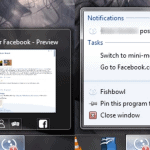
» If you are a Windows 7 user, you can monitor your Facebook stream right from your taskbar using jumplists.
If you want to give it a try then click the link below.
In PDC ‘09, Microsoft unveiled a prototype called Pivot, created by Microsoft Live Labs that claims to revolutionize the way we search the web by introducing a new dimension called ‘visual search’. Redmond company explains that Pivot lets users experience the web in a more subtle and ‘visual’ way, instead of series of pages.
Powerful, informative and fun – this is what Pivot is, in it’s classical sense. The introductory paragraph of the official Pivot website reads, “We tried to step back and design an interaction model that accommodates the complexity and scale of information rather than the traditional structure of the Web.”
Currently available to a handful of people, you can request for an invite in order to use Pivot. I was lucky enough to get an invite. Upon installation, I was represented with, what seemed like, a homepage:
Pivot can be used in two ways:
» As a regular browser to surf the web
» As a visual search tool to browse collections.
When used as a regular browser, Pivot is just a clone of Internet Explorer, only a bit less customizable. When it comes to rendering pages, it uses the same Trident layout engine used in IE.
The beauty of Pivot is in its ability to browse specially created collections which are infact massive information clusters. As of now, the Live Labs have offered sample Pivot collections to mingle with. Ofcourse users can create their own collections and share it with others. However, understanding the basic architecture and the three types of collections is a bit too nerdy. That is why, Microsoft has challenged developers to create custom collections based on existing web services.
Types of Pivot Collections:
Minimum requirements:
» Windows 7 / Windows Vista with ‘Aero’ enabled. (Pivot is not compatible with Windows XP and Windows Server Editions as of now.)
» Internet Explorer 8.
» .NET Framework 3.5 SP1
» 2-GHz 32-bit (x86) or 64-bit (x64) processor.
» At least 256 MB of video memory.
Note: Pivot does not support Intel integrated video chipsets without additional acceleration hardware.
The road ahead…
Considering the strong foundation on which Pivot is built, one can expect it to be helpful in these scenarios:
» Create collections from data in existing online services.
» Use collections as a front end to desktop search.
» Display data sets from academical studies.
» To visualize stock market data.
» Using Pivot for personal photo galleries, or social networks.
Finally, here is a demonstration video of Microsoft Pivot in action.
Note: You are required to enter an installation code without which Pivot won’t install. You can either wait for your installation code or get one from me. I have 2 codes which are good for 19 more installations. Just leave a comment with your e-mail address and I shall give it to you.
We are not yet out of Microsoft’s PDC’09 hangover and there are some exciting news coming by from GooglePlex, Silicon Valley. Google organized a tech press meet to reveal the first impressions of Google Chrome OS that’s scheduled to arrive later next year. However, looking at the swiftness in the development, it’s more likely that Google is all set to surprise us.
Sticking to its early remarks on Chrome OS, Google declared that the three major things that they want to incorporate are speed, simplicity and security. Taking the side of cloud computing, Google Chrome OS is expected to be just a browser that’s easy to use with zero maintenance as it’s all about Web applications.
The following screenshots are courtesy Sam Diaz of ZDNet (modified to get along with the description) who was at the Googleplex when the demonstrations were going on. From the screenshots, Chrome OS looks just like Chrome browser but hey, this is just a first glimpse of the foetus. It’s definitely more likely that the UI does a make over.
It shows tabs of the ‘browser’ where you can find the apps. The most stressed feature being speed, the extremely lightweight ‘panels’ will replace what we commonly refer to as ‘windows’. And so, there is ‘panel’ for everything – notepad, music player, etc. Next up, is the Chrome button, that serves the task of ‘start menu’ where all the apps dwell.
Apparently, one can customize it according to their own preferences like opening multiple windows, stack up favorite tabs, etc.
The Engineering Director Matt Papakipos seems very keen on the speed factor when he revealed that all devices were based on solid state storage and the out-of-RAM boot being the reason for a hyper quick boot. You can check out the extended article here.